

TradingView
Browser, desktop, and mobile Supercharts with screeners, alerts, and Pine Script.
Reviewed
Quick verdict
TradingView
Last verified August 27, 2026
Start here if you want free charts and a screener in the browser. Pay when you need more alerts, more indicators on one chart, or server-side Pine.
Sourced fit
- Supercharts on web, desktop, and mobile, with plan-capped charts per tab, indicators, alerts, and historical bars.
- Stock, ETF, DEX, and crypto screeners; the pricing page lists 150+ exchanges from 50+ countries.
- Pine Script for custom indicators and strategy backtesting; paper trading and trade-through-selected-brokers are listed.
Sourced limits
- Paid plans do not include exchange real-time data fees; extra feeds are sold separately.
- The pricing page states only the Ultimate plan is available for professional users.
- Monthly-billing dollar prices are unverified as of 2026-08-27; public figures were billed annually.
- Not a broker. Execution depends on a connected broker that TradingView lists for your account.
This directory may earn a commission if you buy through links. There is no affiliate link on this page yet. This button goes to the official homepage.
Pricing
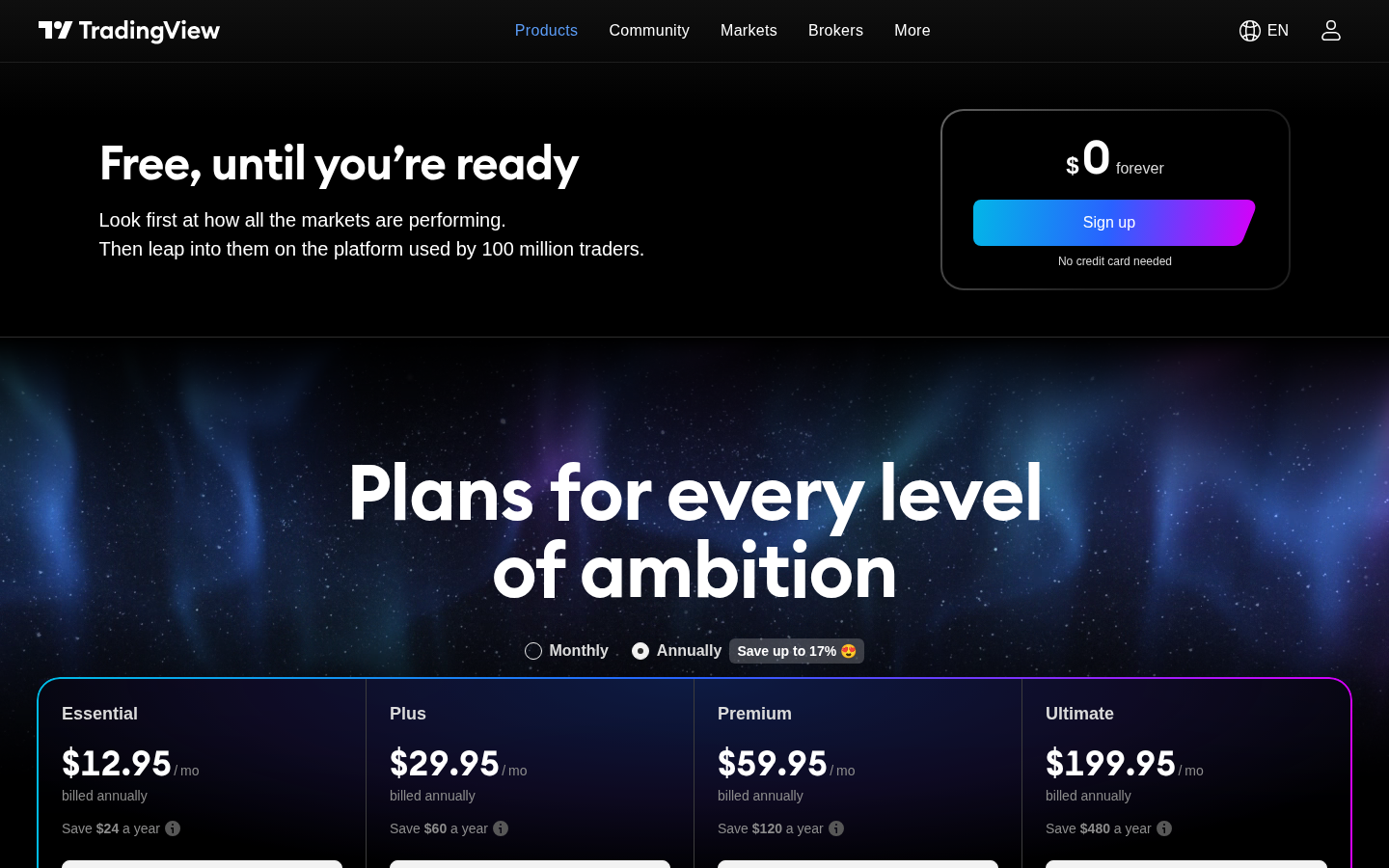
Headline prices on tradingview.com/pricing as of 2026-08-27, shown billed annually and labeled Special price. Monthly-billing dollar prices unverified. Exchange real-time data is extra. Confirm on the official site before you pay.
Verdict
TradingView is charting and screening software. Supercharts run in the browser, on desktop, and on mobile. Public product and pricing pages describe screeners, watchlists, alerts, Pine Script®, paper trading, and the option to connect selected brokers and send orders from the chart.
The public Basic plan is $0 forever with “No credit card needed,” one chart per tab, two indicators, 5K historical bars, and three price alerts. That is enough to open a chart and run a screener. Paid plans raise those caps; the paid-plan cards list “No ads.”
This is a directory listing of analysis software, not a brokerage of its own, not a signal service from this directory, and not a source of investment advice. TradingView’s own help pages describe discovering integrated brokers, connecting an account, and placing orders on Supercharts — that is broker execution through a third party, not TradingView holding your cash. This directory does not treat a public idea, script, or community post as a recommendation.
We are not saying TradingView is the best charting tool, the best screener, or the best purchase. We are not saying it will make a strategy profitable.
The pricing page (captured 2026-08-27) used the marketing line “the platform used by 100 million traders.” That is vendor copy, not a measurement we audited.
Best for
- Chart and screen stocks in a browser or an app. Public pages describe Supercharts, drawing tools, built-in plus community indicators, watchlists, and stock / ETF / DEX / crypto screeners.
- Starting free. Basic is $0. You can look at a chart and filter a universe without a paid seat.
- Pine Script users who want custom indicators and strategy backtesting that run on TradingView’s servers, plus the community script library (pricing page: 100K+ community-powered indicators; Pine docs: more than 150,000 Community Scripts).
- Optional paper trading or sending orders through a connected broker that TradingView lists for your account. Those are extra jobs, not reasons to call the tool number one, and not a broker comparison from this directory.
- Readers in Canada who want Canadian-listed coverage that official pages already name (Canada markets page; TSX / TSXV / NEO / CSE in widget docs). That is not “US-only.” It is also not a claim about Wealthsimple, TD, or other unnamed brokers.
Skip if
- You want TradingView to be the broker. This is not a broker comparison. Execution, if you use it, is through a connected broker that TradingView lists for your account.
- You want stock picks, alerts-as-advice, or a ranked “best trade.” Community ideas and scripts are other users’ work. They are not this directory’s ranking.
- Professional / commercial users who only want a cheap Essential / Plus / Premium seat. The pricing page states that only the Ultimate plan is available for professional users. TradingView’s professional-status help article says the same. Confirm current policy with TradingView; subscriber status is defined in that article and in TradingView’s terms.
- Your primary job is options payoff diagrams or unusual-flow scanning. Those jobs belong on visualize an options payoff and scan unusual options flow.
- You assume a paid TradingView plan includes live exchange data. Official help states that paid plans do not cover exchange real-time data fees; extra feeds are sold separately (or, for some brokers, verified from an existing broker data entitlement).
What you get at each price
Headline figures on tradingview.com/pricing as of 2026-08-27. The page defaulted to Annually, labeled “Special price”, billed annually, with a control “Save up to 17%.” A Monthly toggle exists; exact monthly-billing dollar prices were not shown in the annual view we captured, so those dollar amounts are unverified as of 2026-08-27.
| Basic (Free) | Essential | Plus | Premium | Ultimate | |
|---|---|---|---|---|---|
| Public price as shown | $0 forever; “No credit card needed” | $12.95 / mo billed annually; “Save $24 a year” | $29.95 / mo billed annually; “Save $60 a year” | $59.95 / mo billed annually; “Save $120 a year” | $199.95 / mo billed annually; “Save $480 a year” |
| Trial as shown | — | 30 days | 30 days | 30 days | 14 days |
| Ads | Not listed as “No ads” | Paid-plan cards list “No ads” | Paid-plan cards list “No ads” | Paid-plan cards list “No ads” | Paid-plan cards list “No ads” |
| Charts per tab | 1 | 2 | 4 | 8 | 16 |
| Indicators per chart | 2 | 5 | 10 | 25 | 50 |
| Historical bars | 5K | 10K | 10K | 20K | 40K |
| Active price alerts | 3 | 20 | 100 | 400 | 1,000 |
| Active technical alerts | — | 20 | 100 | 400 | 1,000 |
| Active watchlist alerts | — | — | — | 2 | 15 |
| Minute history (Bar Replay) | — | 180 days | 365 days | All | All |
| Second history | — | — | — | All | All |
| Tick history | — | — | — | — | 7 days |
Also listed on that page:
- Enterprise: “Need 100+ subscriptions? Get in touch.”
- Sales tax may be added depending on location. TradingView, Inc. is described as registered for sales tax in certain countries.
- Extra real-time exchange data is billed separately (see Data below).
- FAQ: cancel anytime; paid service stays active for the paid term; a canceled trial stops immediately.
- FAQ refunds: annual plans only, requested within 14 calendar days. No refunds for upgrades to a more expensive plan, monthly plans, or market data, even if cancelled the same day. Chargeback / dispute filers are stated as ineligible.
- Payment methods listed: major credit cards, PayPal, Apple Pay, crypto (including Binance Pay via Triple-A); mobile apps also use App Store / Google Play methods.
Prices change. Confirm on TradingView’s pricing page before you pay. This directory does not sell TradingView and has no affiliate URL.
Pros and cons
Sourced from the official pages listed under Verified features. We do not invent partner-program payout rules.
Pros
- Pine Script plus a large community library — 100K+ community-powered indicators on the pricing page; Pine Script docs separately say the community has published more than 150,000 Community Scripts.
- A usable free starting point: Supercharts, a screener, three price alerts, and “No credit card needed” on the Basic card.
- Web, desktop, and mobile apps. Paid-plan cards list “No ads.”
- Canadian-listed coverage is named on official pages (Canada markets page; TSX / TSXV / NEO / CSE in widget docs).
- Optional broker routing is documented. Official pages we reviewed name Questrade and Interactive Brokers.
Cons
- Paid plans do not include live exchange data. Official help states that most stock and futures exchanges charge extra for real-time data; extra feeds are sold separately. Default U.S. stock data is from Cboe Exchange and is “slightly different from that of the primary exchanges.”
- Extra real-time data purchased on TradingView is stated not to apply to TradingView widgets.
- Only the Ultimate plan is listed as available for professional users.
- Monthly-billing dollar prices are unverified as of 2026-08-27.
- Web checkout methods listed: major credit cards, PayPal, Apple Pay, crypto (including Binance Pay via Triple-A). Mobile apps also use App Store / Google Play methods. That is a payment-method split already on the pricing page — not a claim about affiliate cookies. There is no affiliate link on this page.
Vs TrendSpider, Finviz, and a broker on TradingView
This is not a ranking. These are neighboring listings for the same job, plus a note on optional broker routing. We do not invent star ratings.
| TradingView | TrendSpider | Finviz | |
|---|---|---|---|
| Status on this directory | Live review | Stub | Stub |
| Job | Chart and screen stocks | Chart and screen stocks | Chart and screen stocks |
| What official pages describe | Supercharts, screeners, Pine Script, optional broker routing | Automated technical analysis, charts, and scanners | Stock screener, heatmaps, news, and quote pages |
| Price captured here | Free + annual specials on 2026-08-27 (see table above) | Current plan names and prices unverified as of 2026-08-26 | Elite versus free features unverified as of 2026-08-26 |
| Canada | Canada markets page and TSX-family widget docs; unnamed Canadian retail brokers unverified as of 2026-08-27 | Canadian listings unverified as of 2026-08-26 | Whether Canadian listings are included unverified as of 2026-08-26 |
Broker on TradingView. TradingView is still analysis software. Public pages describe trading through selected brokers from Supercharts. That is third-party execution, not TradingView holding your cash, and not a broker comparison from this directory. Official pages we reviewed name Questrade and Interactive Brokers. Wealthsimple, TD Direct Investing, Qtrade, and similar Canadian retail names were not named — compatibility is unverified as of 2026-08-27.
FAQ
Is the free plan enough?
For opening a chart and running a screener, yes — Basic is $0, with 1 chart per tab, 2 indicators, 5K historical bars, and 3 price alerts. Pay when you need more alerts, more indicators on one chart, more charts per tab, longer minute or second history for Bar Replay, or the higher Pine calculation-time limits. Paid-plan cards list “No ads”; Basic does not list that line.
Does it work in Canada?
Yes as charting and screening software with Canadian-listed coverage that official pages already name. TradingView’s Canada markets page lists Canadian stocks, TSX-family indices (examples on that page: S&P/TSX Composite, S&P/TSX 60, S&P/TSX Venture Composite), ETFs of Canada, and Canadian economic series. Official widget market-data docs list TSX (delayed stocks and indices), TSXV (delayed stocks and indices), NEO (delayed stocks), and CSE (end-of-day stocks and indices). Exact Supercharts delay length and real-time package dollar fees for those exchanges are unverified as of 2026-08-27. Questrade and Interactive Brokers are named for broker connections. Wealthsimple, TD Direct Investing, and Qtrade are unverified as of 2026-08-27. Do not infer them.
Do I need a broker on TradingView?
No. Charting, screening, watchlists, alerts, and Pine Script do not require a connected broker. Connecting a broker is optional if you want to send orders from the chart. Paper trading is listed as simulated practice with virtual funds.
Verified features
Sourced from tradingview.com, tradingview.com/pricing, tradingview.com/features, tradingview.com/markets/canada, tradingview.com/widget-docs/markets/north-america, tradingview.com/pine-script-docs/welcome, the Questrade integration blog post (28 May 2024), and these help articles on 2026-08-27: Finding your perfect broker, How to purchase additional market data, How can I get real-time data from exchanges that I have already purchased with my broker?, and The difference between professional and non-professional status. We do not list features we could not confirm on those pages. Boolean plan checkmarks in the pricing comparison table often did not survive our HTML capture; where a cell was blank we do not invent a yes or a no.
Supercharts (publicly described)
Numeric limits from the pricing comparison table (Basic / Essential / Plus / Premium / Ultimate):
| Limit | Basic | Essential | Plus | Premium | Ultimate |
|---|---|---|---|---|---|
| Charts per tab | 1 | 2 | 4 | 8 | 16 |
| Indicators per chart | 2 | 5 | 10 | 25 | 50 |
| Indicator on indicator | 1 | 1 | 9 | 24 | 49 |
| Historical bars | 5K | 10K | 10K | 20K | 40K |
| Simultaneous chart connections | 2 | 10 | 20 | 50 | 200 |
| Customizable chart types | 17 | 17 | 17 | 21 | 21 |
| Financials per chart | 1 | 4 | 7 | 10 | 25 |
| Historical annual financials on charts | 7 years | 20 years | 20 years | 20 years | 20 years |
| Historical quarterly financials on charts | 8 years | 8 years | 8 years | 8 years | 8 years |
| Minute history | — | 180 days | 365 days | All | All |
| Second history | — | — | — | All | All |
| Tick history | — | — | — | — | 7 days |
| Calculation time limit | 20s | 40s | 40s | 40s | 100s |
Also listed on the pricing and features pages:
- 400+ built-in indicators and strategies
- 100K+ community-powered indicators on the pricing page; Pine Script docs separately say the community has published more than 150,000 Community Scripts
- 110+ smart drawing tools
- Volume profile indicators, candlestick pattern recognition, multi-timeframe analysis, and auto chart patterns (features page)
- Bar Replay, with history depth that varies by plan (see minute / second / tick rows above)
- Web, desktop, and mobile apps; the comparison table also lists native multi-monitor support and tab linking on desktop, plus native push alerts and Android / iOS widgets
- Paid-plan cards list “No ads”
Saved chart-layout counts in the captured table were 1 / 5 / 10 for Basic / Essential / Plus; Premium and Ultimate cells were blank, so those counts are unverified as of 2026-08-27.
Screeners and lists (publicly described)
- Stock, ETF, DEX, and crypto screeners
- “150+ exchanges from 50+ countries” and “500+ fundamental and technical fields”
- Screener auto-refresh: 1 minute on Basic; “10 sec / 1 min” on paid plans
- Screener timeframes: D / W / M on Basic; “All” on paid plans
- Watchlist symbol cap: 30 on Basic; 1,000 on paid plans
- Number of watchlists: 1 on Basic; paid-plan cells were blank, so those counts are unverified as of 2026-08-27
Alerts (publicly described)
| Limit | Basic | Essential | Plus | Premium | Ultimate |
|---|---|---|---|---|---|
| Active price alerts | 3 | 20 | 100 | 400 | 1,000 |
| Active technical alerts | — | 20 | 100 | 400 | 1,000 |
| Active watchlist alerts | — | — | — | 2 | 15 |
| Alert duration (where a number was shown) | 1 mo. | 2 mo. | 2 mo. | — | — |
Paid-plan marketing cards list “Alerts that don’t expire” among higher-tier features. Which exact plans get non-expiring alerts was not a filled number in the captured table, so that mapping is unverified as of 2026-08-27 beyond the duration numbers above.
Pine Script and backtesting (publicly described)
- Pine Script is TradingView’s language for indicators and strategies that run on TradingView’s servers.
- Docs are currently labeled Pine Script v6.
- Strategy backtesting, report metrics, CSV / XLSX export, and “deep backtesting” appear as rows on the pricing comparison. Which plans include each backtesting extra is unverified as of 2026-08-27 where the captured cells were blank.
Trading workflow (publicly described)
- “Trade through selected brokers,” chart trading, and simulated (paper) trading are listed on the pricing comparison.
- Help: open Supercharts, click Trade, pick a broker, log in with broker credentials, then place and manage orders from the chart.
- Paper trading is described as simulated conditions with virtual funds, customizable balances / leverage / currency / commissions, multiple accounts, and margin support.
- This directory does not treat paper-trading contests, prizes, or community ideas as evidence of skill or as a recommendation.
Data (publicly described)
- Pricing page: “hundreds of data feeds” and a live instrument count (the page stated 3,539,722 instruments on the day we captured it). Treat that count as a snapshot, not a promise.
- Help: most stock and futures exchanges charge extra for real-time data; paid TradingView plans do not cover those fees.
- Extra real-time / intraday data (examples named on the pricing FAQ: NASDAQ, NYSE, NYSE ARCA, OTC, CME) can be added separately; you need a paid plan or a trial.
- Default U.S. stock data is from Cboe Exchange and is “slightly different from that of the primary exchanges”; NASDAQ / NYSE / ARCA real-time can be added.
- Crypto exchanges on TradingView are described as providing real-time data.
- Extra real-time data purchased on TradingView is stated not to apply to TradingView widgets.
- Maximum extra market-data subscriptions allowed: Essential 2, Plus 4, Premium 6; Basic and Ultimate cells were blank, so those two caps are unverified as of 2026-08-27.
Professional status (publicly described)
- Pricing page: “Only the Ultimate plan is available for professional users.”
- Help: professional vs non-professional is about how data and the tools are used. Registered persons (the article names FINRA, NFA, CSA and similar) are professional. Non-professional status requires confirming a list of personal-use conditions (individual, personal funds, not advising others, and the rest of that article).
- A separate tax-help article still names “Expert and Ultimate” as professional plans. Expert was not a plan name on the pricing page we captured on 2026-08-27. Whether Expert is a current public tier is unverified as of 2026-08-27.
Canada note
This directory is written with readers in Canada as well as the United States.
Canadian listings. TradingView operates a public Canada markets page that lists Canadian stocks, TSX-family indices (examples on that page: S&P/TSX Composite, S&P/TSX 60, S&P/TSX Venture Composite), ETFs of Canada, and Canadian economic series. Official widget market-data docs list TSX (delayed stocks and indices), TSXV (delayed stocks and indices), NEO (delayed stocks), and CSE (end-of-day stocks and indices). So Canadian-listed coverage is not “US-only” on those official pages.
What we did not capture as a filled Supercharts data-coverage row: the exact delay length on Supercharts for TSX / TSXV, or the current real-time package dollar fees for those exchanges. Those figures are unverified as of 2026-08-27. Official help still says real-time stock data is generally an extra purchase (or a broker-verified entitlement), not something a paid TradingView plan includes by default.
Montréal Exchange options and other Canadian derivatives coverage beyond what those pages name is unverified as of 2026-08-27.
Canadian broker connections — named on official pages
- Questrade. A 28 May 2024 TradingView blog post, titled for Canadian traders, says Questrade users can access accounts, execute trades, and analyze markets from TradingView via the trading panel. A current help table lists Questrade for broker-verified real-time data on TSX, TSXV, NASDAQ, NYSE, AMEX (NYSE Arca), OTC, OPRA, and CBOE Futures (verification expires in 7 days, prolonged on the next Trading Panel login).
- Interactive Brokers. Official blog and help name Interactive Brokers as an integrated broker. The same help table lists IBKR (with CapTrader, Mexem, Interactive IL) for verified real-time data that includes TSX, among many other venues. The page does not say “Interactive Brokers Canada” as a separate brand; we do not invent that label.
Not named on the official pages we reviewed: Wealthsimple, TD Direct Investing, Qtrade, and similar Canadian retail names. Compatibility with those brokers is unverified as of 2026-08-27. Do not infer it.
Currency (CAD vs USD), registered-account constraints (TFSA, RRSP), and Canadian tax treatment of trades are outside this review.
Confirm pricing, data rights, symbol coverage, and broker availability on the official site. Official homepage only: tradingview.com. There is no affiliate link on this page.